
We’ve enhanced Specific File Requests to make collecting and organizing documents easier.
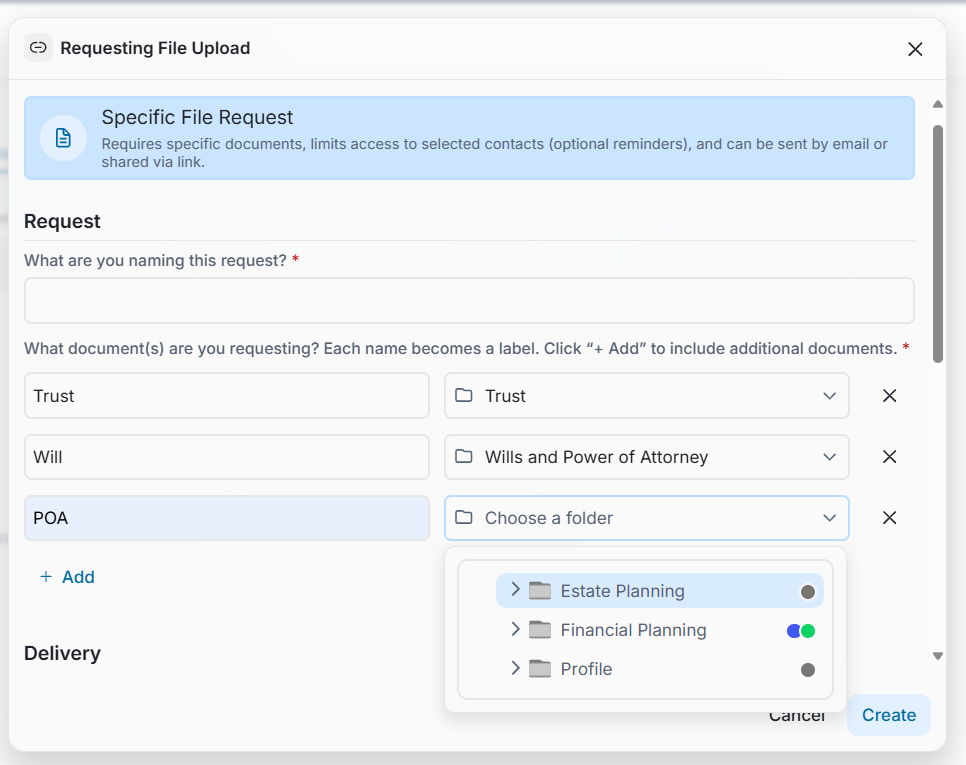
You can now request multiple documents in a single request and select a different destination folder for each document. You can also create Specific File Requests directly from the Share tab, giving you another convenient way to start a request.
For Portals with AI capabilities enabled, requests created from an Insight can also recommend the best destination folder for each requested document based on your folder names and descriptions.
You remain in control—you can review and change any suggested folder before sending the request.
Why This Matters (Benefits)
Document collection should be simple for your team and for your clients. This enhancement reduces the administrative work involved in requesting, receiving, and organizing multiple documents.
By defining each document's destination before the request is sent, files can arrive in the right place from the start—reducing manual filing and the risk of storing documents in the wrong folder.
Key benefits include:
Fewer requests to manage: Collect several documents through one Specific File Request instead of creating separate requests for each document or destination.
Less manual filing: Each requested document is automatically routed to its selected folder after upload.
Better organization: Documents are filed in the correct location from the moment they are received.
Reduced filing errors: Predetermined destinations help prevent documents from being accidentally stored in the wrong folder.
Simpler client experience: Clients receive one link and one clear list of the documents they need to provide, even when those documents belong in different folders.
Faster request creation with AI: When available, AI can recommend the most appropriate folder for each requested document based on your existing folder names and descriptions.
You stay in control: AI suggestions can always be reviewed or changed before the request is sent.
More flexible workflows: Specific File Requests can now also be initiated directly from the Share tab, making document collection easier to access as part of your day-to-day workflow.
The result is a more efficient request → upload → filing process, with less manual intervention for your team and a simpler experience for your clients.
What Problem It Solves
Collecting several documents from a client can require multiple requests, additional instructions, and manual organization after the documents are received.
When different documents belong in different areas of the Vault, users may also need to move or refile uploaded documents after the request is completed.
The enhanced Specific File Request workflow simplifies this process by allowing you to:
Request multiple documents at the same time.
Select the appropriate destination folder for each requested document.
Send the recipient one request instead of separate requests for each destination.
Have each uploaded document automatically filed in its designated folder.
Reduce the need to manually move and organize documents after they are received.
The result is a simpler experience for both the person requesting the documents and the person uploading them.
How It Works
Request Multiple Documents at Once
A single Specific File Request can now include multiple requested documents.
For example, instead of creating separate requests for a Trust, Will, and Power of Attorney, you can include all three in one request. Each requested document has its own label and destination folder. By default, the folder location will be the folder where the request is being created; click on the Folder to change it
Choose a Different Folder for Each Document
You can select exactly where each requested document should be stored.
Documents in the same request don't need to share the same destination folder. Once the recipient uploads the requested files, the system automatically saves each document to its assigned location.
This helps ensure documents are organized correctly from the moment they enter the Vault.
Create Requests from the Share Tab
You can now create a Specific File Request directly from the Share tab, making it easier to initiate document collection as part of your existing sharing workflow.
AI-Powered Folder Suggestions
For Portals with AI capabilities enabled, a Specific File Request created from an Insight can suggest the most appropriate destination folder for each requested document.
The recommendation considers your existing folder names and descriptions to help determine where each document belongs.
AI suggestions are designed to speed up setup—not replace your control. You can review and change any suggested destination before sending the request.
One Simple Experience for Your Client
Even when you request several documents to be stored in different locations, your client receives one simple request link.
They can upload all requested documents from the same experience, while FutureVault routes each file to the destination you selected.